
Free Trial VPN With No Credit Card:
The Complete 2026 Guide
Which VPN trials are truly card-free, which ones are not, and how to test any VPN in one real workday.

- A free trial VPN is a short, full-feature test of a paid VPN before you pay.
- Only a few VPNs offer a free trial with no credit card. In October 2026, the clearest examples are CyberGhost's 24-hour desktop trial and Proton VPN's free plan.
- Most "free trials" need a payment method, even when they charge you nothing on day one.
- A money-back guarantee is not a free trial. You pay first and ask for a refund later.
- Remote workers should test speed, video calls, and file uploads during the trial, not just visit one website.
- Set a cancel reminder the moment any trial starts.
- Trial terms change often, so check the provider's own page before you sign up.
Introduction: Maria's Cafe Problem
Maria opened her laptop at a busy Austin cafe. She had a client file to send in ten minutes. The cafe WiFi had no password at all.
She searched for a VPN and found a wall of "free trial" offers. Each one asked for a credit card. She closed the tab.
Maria is not alone. Gallup's May 2026 data shows 52% of remote-capable US employees work hybrid and 26% work fully remote. That means about 78% of them work away from the office at least part of the time. Many of them use public WiFi.
(Maria is a composite example. Her story shows what many freelancers face.)
What Is a Free Trial VPN With No Credit Card?
A free trial VPN with no credit card is a limited-time test of a paid VPN that asks for no payment details at sign-up. It gives you full features for a short time. When the time ends, access stops without a charge.
A service that encrypts your internet traffic and hides your IP address.
A short test period that lets you use a paid product before you buy.
These cases are rare. Most providers want a payment method on file so the trial can turn into a paid plan.
Why Does a Free Trial VPN Matter for Remote Workers in 2026?
A trial matters because a VPN affects daily work speed. A slow VPN can break video calls and file uploads. A trial lets you check this before you spend money. It is cheaper than guessing.
Remote work is now normal for many knowledge workers. Stanford's WFH Research tracks this shift, and Gallup reports that hybrid is the most common setup. More people work from cafes, coworking spaces, and airports. Each place has WiFi you do not control.
If you work from home most days, our work-life balance guides for remote workers show how to keep your setup simple and calm.
Free Trial VPN vs Free VPN: What's the Difference?
A free trial VPN is a time-limited test of a paid service. A free VPN is a permanent plan with limits, such as less data or fewer countries. Trials give you full features briefly. Free plans give you fewer features forever.
- Full features for 1 to 7 days
- Best for: testing before you buy
- Example: Maria tests a paid VPN for one day to see if video calls stay smooth.
- Limited features, no end date
- Best for: light use, like checking email on public WiFi
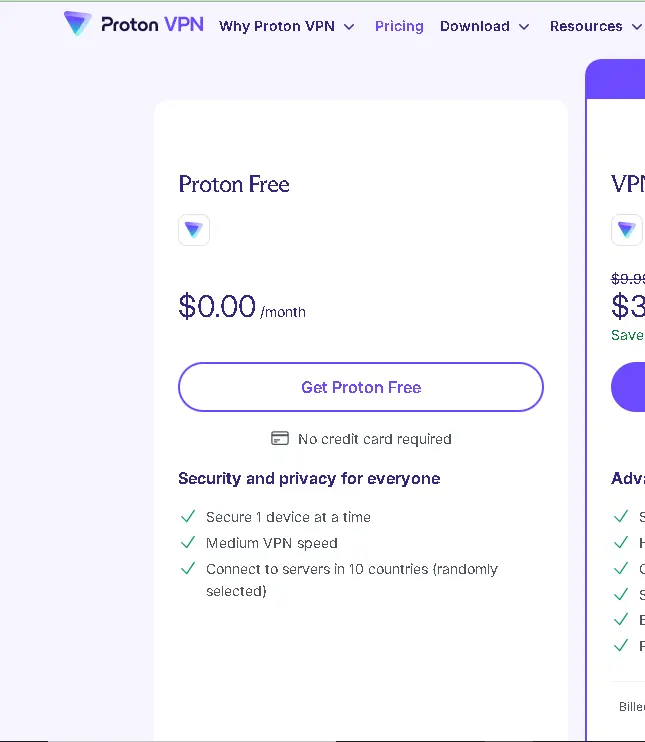
- Example: Maria uses Proton VPN's free plan for basic browsing. It has no time limit and needs no card, but it limits you to one device and fewer server countries.
| Question | Free trial | Free plan |
|---|---|---|
| How long? | 1–7 days | Unlimited time |
| Full features? | Yes | No |
| Card needed? | Usually yes | Usually no |
| Best for | Deciding to buy | Light daily use |
Want the full picture of free options? Read our Free VPN for Remote Workers guide.
Which VPNs Really Offer a Free Trial With No Credit Card in 2026?
| VPN | Trial | Card needed? | Platforms |
|---|---|---|---|
| CyberGhost | 24 hours | No (desktop) | Windows, macOS |
| Proton VPN | Free plan, no end date | No | Windows, macOS, Linux, Android, iOS |
| NordVPN | 3 days | Payment method via Google Play | Android |
| Surfshark | 7 days | Yes | Mobile and desktop (check current terms) |
| PIA | 7 days | Via app store | Android, iOS |
Here is what to know about the main ones.
CyberGhost
CyberGhost lists a 24-hour trial for Windows and macOS with no payment details, a 3-day Android trial, and a 7-day iOS trial. The mobile trials run through the app stores, so they ask for a payment method. Only the desktop trial is truly card-free.

Proton VPN
This is not a trial. It is a free plan. That is actually better for some people, because nothing expires. The trade-off is fewer countries and one device.
NordVPN
NordVPN offers a 3-day Android trial through Google Play. In some countries, new customers can also get a 7-day trial on its website with a 1- or 2-year plan. Older articles say the Android trial lasts 7 days. That is outdated.
Surfshark
Surfshark offers a 7-day trial on eligible 12- and 24-month plans, using a card, PayPal, or Apple Pay. It needs a payment method, so it is not card-free.
How Do VPN Money-Back Guarantees Work When a Card Is Required?
A money-back guarantee lets you pay for a plan and get a refund if you cancel within a set time, often 30 days. It is not a free trial because you pay first. It is a safe option when a provider has no real trial. Here is how it usually works:
- You buy a plan on the provider's website.
- You use the VPN for up to 30 days.
- You ask support for a refund inside the time limit.
- The money returns to you, usually in a few business days.
PIA, for example, pairs a 7-day mobile trial with a 30-day money-back guarantee. Rules differ by provider. Some refunds apply only to purchases made on the website, not through an app store. Some allow it only once per account.
- Longer test time than a trial
- Full features
- You must pay first
- You must contact support and wait
How Do You Start a Free VPN Trial Step by Step?
Here are the steps with more detail.
- Pick one trial. Choose from the table above. For no card, start with CyberGhost on Windows or Mac.
- Use the official source. Go to the provider's own website or your official app store. Never download VPN apps from random links. Fake VPN apps exist.
- Download and install. On desktop, run the installer. On mobile, tap Install.
- Create your account. Use an email you check often. Confirm it if asked.
- Activate the trial. On CyberGhost desktop, click the activation link in your email.
- Connect to a server. Choose a nearby location first for speed.
- Set a reminder. If the trial needs a payment method, add a calendar reminder for one day before it ends.
New to VPNs? Our How to Get a VPN guide explains setup from zero.
How Can You Avoid Being Charged After a VPN Trial?
To avoid charges, cancel before the trial ends, using the same place you signed up. App store trials are cancelled in the app store subscription settings. Website trials are cancelled in your account page. Set a reminder one day before the end. Follow this short routine:
- Cancel on day one. Many trials let you cancel right away and still use the full trial time. Check the provider's terms first.
- Cancel where you signed up. Google Play runs the Android NordVPN trial, so you cancel it in Google Play. Deleting the app does not cancel it.
- Check your email. Save the sign-up email as proof.
- Check your bank or app store history a few days later.
How Should Remote Workers Test a VPN During a Short Trial?
Remote workers should test a VPN with real work tasks: a video call, a large file upload, and a normal work session. Speed tests alone are not enough. A VPN that looks fast on a speed test can still lag on calls.
Maria used her 24-hour trial this way. She did not just open a website. She ran her real workday through the VPN. Your trial checklist:
- Join a 10-minute video call on the VPN
- Upload a large work file (for example, 100 MB)
- Open your work tools (email, cloud storage, project app)
- Try one nearby server and one far server
- Test on cafe or hotel WiFi if you can
Take notes as you go. Good work habits matter too — our 25 productivity tips for remote workers pair well with a secure setup.
Pro Tips From Experts
- Test before the deadline. Start a trial on a day you will really work, not on a lazy Sunday.
- Compare two VPNs back to back. Use the same file and the same call. That keeps the test fair.
- Read the renewal price. The first-year deal can be much cheaper than renewal.
- Check the no-logs claim. Look for independent audits, not just marketing words.
- Do not forget rest. A secure setup helps, but work stress needs its own plan. See our burnout guide.
Common Mistakes to Avoid
- Confusing a free plan with a free trial. A free plan has limits forever. A trial has full features for a short time.
- Trusting "no credit card" headlines. Many "no card" claims are about the website sign-up, but the app store still asks for payment.
- Using a random download link. Always go to the official source.
- Forgetting to cancel. This is the number one cause of surprise charges.
- Testing only one website. Test your real work tasks.
Only on remoteworksetup.info: The 24-Hour Remote Work Trial Plan
Most guides tell you to "try the VPN." We give you a plan. Use this schedule on a real workday when you start a 24-hour trial.
| Time | Test | What to look for |
|---|---|---|
| Hour 0 | Install and connect | Does it connect in under a minute? |
| Hour 1 | Normal browsing and email | Any slowdowns or captchas? |
| Hours 2–4 | Real work session | Do cloud tools load normally? |
| Hour 5 | Video call | Is the audio clear? Any freezing? |
| Hour 6 | Large file upload | Does it finish without errors? |
| Hour 8 | Public WiFi test | Does it reconnect after a drop? |
| Hour 22 | Decide | Keep it, compare it, or drop it? |
What's Next: Your Action Steps
Keep Building Your Setup
Frequently Asked Questions
Conclusion: Try Smart, Not Scared
Maria ran her 24-hour test, sent her client file on a secure connection, and chose her VPN with confidence. She never entered a card number during the first test.
You can do the same. Pick one card-free option, run the 24-hour plan, and decide with real results. A short trial costs nothing and saves you from a bad purchase.
Next step: explore our complete home office setup guide to build a safe, comfortable workspace.