2026 Complete Guide
IDEAL HOME OFFICE SETUP
Build a Workspace That Fits Your Body, Your Budget, and Your Day.
A good home office setup is not about spending the most money. It is about building a space that works the way you do — one that keeps your body comfortable, your mind clear, and your day flowing naturally. Whether you have a spare room or just a quiet corner, this step-by-step guide shows you how to get it right from the very beginning.
Why Your Home Office Setup Changes More Than You Think
Here is something most people do not consider: the space you work in every day shapes how well you think, how long you can focus, and how your body feels by 5 PM. A noisy, uncomfortable, or poorly organized workspace quietly drains your energy — hour by hour, without you even noticing.
A thoughtfully built home office works in the opposite direction. It removes the small daily frustrations so you can sit down, get into the work quickly, and keep going without your environment fighting against you.
01
Sharper Focus
A space used only for work teaches your brain to shift into focus mode the moment you sit down — and to stay there without constantly drifting.
02
Physical Comfort
The right desk and chair protect your back, neck, and wrists from the kind of strain that builds slowly over months and becomes very difficult to undo.
03
Work-Life Balance
Having a defined workspace makes it much easier to mentally leave work behind at the end of the day — even when your home and your office are the same four walls.
📌 The Truth About Home Offices
You do not need a big budget or a dedicated room. Many remote workers do their best work from a simple desk in a quiet corner. What matters most is that you set it up with care — and use it consistently every day.
Pick the Right Space in Your Home
Before you spend a single dollar on furniture or equipment, decide where your home office will actually live. This one decision affects everything else — your focus, your posture, your comfort, and even your ability to switch off from work at the end of a long day.
The single most important thing to look for is quiet. A spot that is away from the TV, away from busy hallways, and somewhere that has at least a visual boundary between work and the rest of your home. Everything else — lighting, furniture, tech — can be fixed later. A noisy location cannot.
Find the quietest spot available to you. That might be a spare bedroom, a corner of your living room, or even a large closet converted into a workspace. The key is that it’s away from the TV, away from heavy foot traffic, and somewhere you can close a door — or at least create a visual boundary — between work and home life.
Which Space Works Best for You?
Spare Room
The best option by far. Full privacy, a door that closes, and clean mental separation between work and home life.
Bedroom Corner
Works well with a small shelf or curtain divider. Keep your desk facing away from your bed to protect your sleep.
Living Room
A practical choice if you live alone. A bookshelf or room divider creates a clear visual boundary for your work area.
Converted Closet
Surprisingly effective. A small desk, a good lamp, and some shelving can turn even a large closet into a focused, distraction-free workspace.
Garden Room
An excellent option. The short walk outside and back creates a natural start and end to your workday — almost like a real commute.
Dining Room
A last resort. Dining areas are hard to keep as a dedicated workspace. Use this only if no other option is available to you.
☀️ Natural light is helpful but neverrequirement. A good adjustable desk lamp works perfectly in any room. Always choose quiet over a window — quiet wins every single time when it comes to focus and sustained productivity.
Choose the Right Desk and Chair
Your desk and chair are the two most important pieces of your home office setup. Get them right and everything else becomes easier to figure out. Get them wrong and no amount of gadgets or accessories will make your workspace genuinely comfortable.
🪑The Chair — Your Most Important Buy
If you sit for six to eight hours a day, your chair is the most important piece of furniture you own — full stop. A poor- quality chair slowly breaks down your posture and your energy. A proper ergonomic chair pays for itself in health and daily comfort within the first few weeks of use.
Lumbar support—Should follow and hold the natural inward curve of your lower back throughout the day.
Seat height—Adjustable so your feet rest flat on the floor and your knees sit at a 90-degree angle.
Armrests—Set at a height that lets your shoulders stay completely relaxed while you type.
Breathable back —A mesh backrest keeps air moving and prevents overheating during long work sessions.
Seat depth—Leave a two to three finger gap between the seat edge and the back of your knees.
Do not skip the chair to cut costs. A cheap chair costs you far more in back pain, poor posture, and lost energy within the first few months than any money you saved buying it.
📐 The Desk — Size and Height
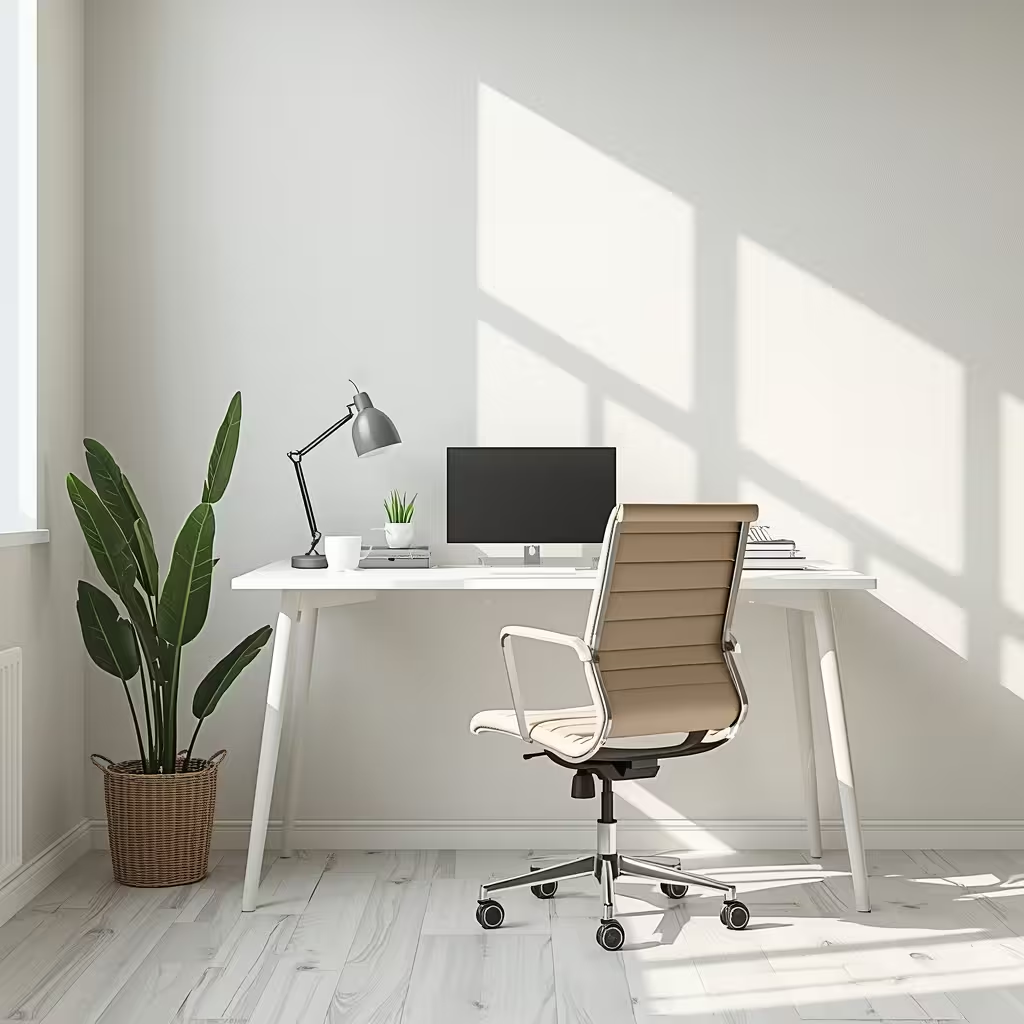
Your desk needs to be wide enough to hold your monitor, a notebook, and a drink without feeling cramped. For most people, a desk between 47 and 55 inches wide is the right size for a comfortable home office.
To test your desk height: sit with good posture and rest your hands on the surface. Your elbows should bend at around 90 degrees. If your shoulders rise when you type, the desk is too high. If you lean forward, it is too low. Both cause real problems over time.
📏A sit-stand desk is one of the best long-term investments for your health and daily energy levels. It is not essential when you are starting out — but worth adding as your budget grows.
⚠️ Avoid Glass Desks: is one of the best long-term investments for your health and daily energy levels. It is not essential when you are starting out — but worth adding as your budget grows.
Set Up Your Tech the Smart Way
Once your furniture is sorted, your technology determines how efficiently you actually work each day. You do not need the fastest or most expensive equipment — you need the right tools for your specific job, placed correctly.
🖥️ Monitor — One Upgrade That Changes Everything
If you work from a laptop alone, adding an external monitor is the single most effective upgrade you can make. More screen space means less time switching between tabs, easier multitasking, and noticeably less eye strain by the end of a long afternoon.
24 to 27 inches —The sweet spot for most home office desks — large enough to be useful, compact enough not to overwhelm the space.
Full HD minimum —1080p for everyday tasks; 2K or 4K for design, video editing, or detailed visual work.
Eye-care display —Look for flicker-free display and a low blue-light mode to reduce strain during long sessions.
Eye-level height —Use a monitor arm or stand to position the top edge of the screen level with your eyes.
⌨️ Keyboard, Mouse, and Headset
An external keyboard and mouse let you position your hands naturally while keeping your screen at the correct height. For most laptop users, this single change removes the main cause of daily wrist and neck strain.
Full-size keyboard
Keeps your wrists straight and removes the discomfort of typing on a small laptop keyboard for hours.
Ergonomic mouse
Fits your hand naturally and reduces wrist and shoulder tension during long work sessions.
Noise-canceling headset
Blocks background distractions and makes your audio clear and professional on every video call.
Internet Connection
A slow or dropping connection breaks your focus, interrupts your calls, and damages your professional reputation. Wherever possible, run an Ethernet cable directly from your router to your desk. A wired connection is always more reliable than Wi-Fi — particularly when it matters most.
Create a Space You Actually Want to Sit In
The physical feel of your workspace — the quality of the light, the temperature, the small personal details around you — affects how you think and perform more than most people realize. These things are easy to overlook and just as easy to get right once you know what to look for.
💡 Lighting —Small Change, Big Difference
Poor lighting causes headaches, tired eyes, and that familiar mid-afternoon energy dip. Good lighting keeps you alert, makes your workspace feel pleasant to be in, and makes you look polished and professional on video calls.
Position your desk so natural light comes in from the side — not from directly behind or in front of your screen
Use an adjustable LED desk lamp for focused work and darker days when natural light is not enough
Shift to warmer light tones after 4 PM to protect your sleep quality later that night
A small ring light or forward-facing lamp makes a dramatic improvement to how you look on video calls
🌿 Air, Temperature, and Personal Touches
A slightly cool room — around 68 to 72 degrees Fahrenheit — keeps your mind noticeably sharper than a warm one. Open a window when you can. Fresh air is one of the most overlooked causes of afternoon brain fog and low energy.
Add one or two personal touches — a small plant, a framed photo, your favorite mug. These cost almost nothing but make a genuine difference. A workspace you enjoy sitting in is a workspace you will naturally perform better in.
Add a small plant, a framed photo, or your favorite mug. These details cost almost nothing but make a real difference — a space you enjoy sitting in is a space you will work better in.
Build Your Ideal Home Office on Any Budget
You do not have to spend a lot to build a workspace that genuinely works. Here is exactly what to focus on at three different budget levels — so you can start today and grow your setup over time as your needs and budget allow.
Starter Setup Under $300
A budget ergonomic chair with lumbar support, a sturdy secondhand desk, an adjustable desk lamp, and a wired keyboard and mouse combo. Simple, practical, and comfortable from your very first day working from home.
Solid Setup Under $600
A budget ergonomic chair with lumbar support, a sturdy secondhand desk, an adjustable desk lamp, and a wired keyboard and mouse combo. Simple, practical, and comfortable from your very first day working from home.
Professional Setup Under $1,000
A sit-stand desk, a noise-canceling headset, a quality webcam, and layered lighting. A complete, long-term home office that handles any type of remote work comfortably and looks professional to everyone you work with.
DIY Tips
Save smart: stack books under your monitor to raise it, roll a towel for lumbar support, and shop second-hand for furniture. Most ergonomic improvements cost absolutely nothing — they are just about using what you already own more wisely.
⚠️ Don’t Do This: Never spend your full budget on tech and leave nothing for a proper chair. A great monitor paired with a $30 chair is one of the most painful and most common home office mistakes. Chair first — always.
Your Home Office Is Worth Getting Right
You spend more hours at your desk than almost anywhere else in your life. A home office setup that supports your body, clears your thinking, and fits naturally into your day is not a luxury—it is a practical investment in how well you work every single day.
Start with what you have right now. Fix your chair first. Raise your screen. Improve your lighting. Then build from there—one smart, well-chosen upgrade at a time.
The right home office setup is not about having everything. It is about having the right things — and using them well every day.